
The menu on the phone, the order from the table, the ticket already split by department
Customers scan the QR code, browse the menu and order from their seat. The order arrives at the counter, announced by voice and already routed between bar, kitchen and pastry. No app to install, for anyone. The digital menu is always free: artificial intelligence and full order management switch on when you need them.
How it works for guests
Four steps, all from the phone's browser. No download, no account needed.
Scan the QR
The code on the table opens the venue's menu and recognizes the table by itself. The table number is never typed: without a code the menu can still be browsed, but the table is opened by the floor staff.
Check in
Pick a language out of eight, state how many people are at the table and, optionally, leave a name. Staff confirm the table before anyone can order.
Choose and order
Browse by category and subcategory, open a dish's page for a big photo, description and allergens, put it in the cart (with a note, if needed) and watch the total update live while composing the order.
Track delivery
The order stays visible under each category: served lines get crossed out on their own, and a voice announces what's coming.
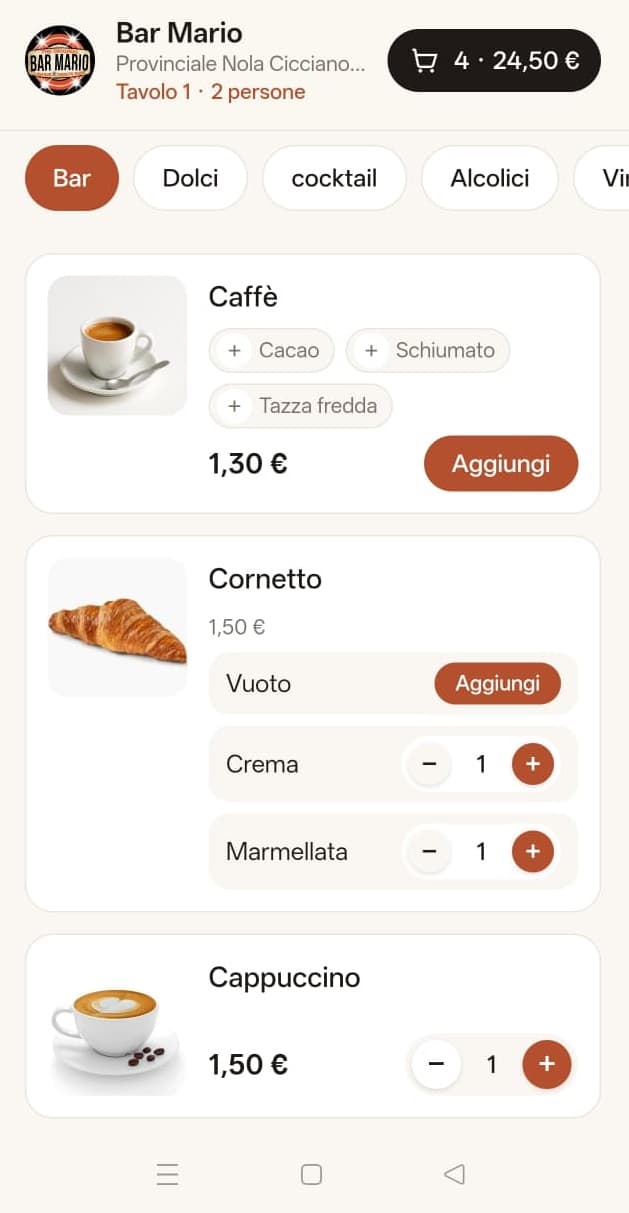
What the guest sees
The table is already recognized, the menu is split by category, and the cart shows item count and total live.
How it works for staff
A single panel, open on a phone or a screen at the counter. It updates itself and announces things by voice, so no one has to stare at it.
Accept the table
Every request shows the table, the number of guests and a name. Until it's accepted, guests can't place an order.
Receive the order
Items arrive already assigned to the department that has to prepare them. At the counter, the “To prepare” view sorts them by department and arrival time, showing how long each line has been waiting.
Prepare and serve
At the counter every line has two buttons: “Ready” tells the waiter there's something to carry, “Served” closes it and the guest sees it crossed out. A single gesture closes all of a table's lines.
Close the bill
Once paid, the table closes and moves to the history, where it stays available.
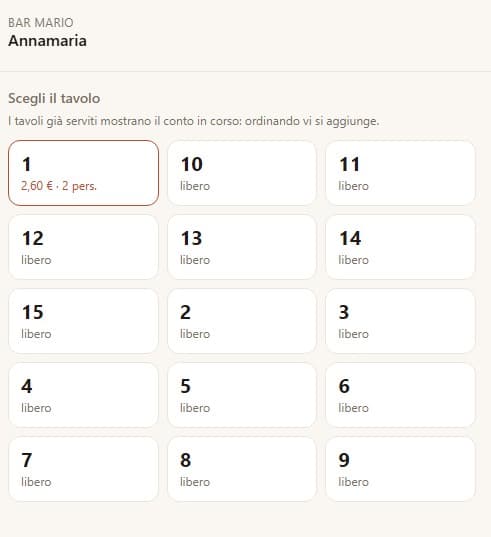
The waiter picks a table
Instantly see which tables are free and which have an open bill, with amount and number of guests.
All the features
The system covers the whole journey, from building the menu to closing the bill: from the free menu to full order management.
Menu and catalog
- Departments, categories and subcategories to organize the menu however you like.
- Item photos, taken or uploaded from the phone.
- Optional description for ingredients or composition.
- Priced variants (e.g. wine by the glass or bottle) and preparation options (e.g. cocoa, sugar) with an optional surcharge.
- Hideable items when they run out, without deleting them or losing their history.
Tables and QR codes
- One QR per table, opening the menu with the table already recognized.
- One QR for the venue, to display at the entrance or counter, one for reservations to put in the window or on social media, and one reserved for the admin.
- Unpredictable codes: a table can't be faked from home.
- NFC tags too: the table's address is kept simple, so it can be written onto a sticker to tap with the phone.
Ordering
- Cart with adjustable quantities per item.
- Personal notes on a single line, e.g. no sugar.
- Total always visible in the header, with item count.
- Follow-up orders on the same table, merged into a single bill.
Orders and departments
- Automatic split: every category points to the department in charge (bar, kitchen, pastry...).
- One list per table, with the department shown next to each line.
- Ready and served: two distinct states, so a coffee left on the counter doesn't get forgotten.
- Side-by-side panels: a screen can track several tables at once.
Voice alerts
- To staff, when a request or an order comes in.
- To the guest, when their order is delivered.
- With vibration where the phone supports it.
- Screen always on on the counter device, so no alert is missed.
Bills and history
- Open tables with opening time and running total.
- Number of guests declared, useful for organizing the room.
- Table closing once payment is made.
- Permanent history: closed bills stay available forever.
Fake orders: the problem and the fix
A menu open to everyone is also a menu that can be "ordered" from home. That's why no one can send an order until staff have accepted their table, and the block is enforced by the system, not just hidden in the screen. Every item's price is always re-read from the server: whatever comes from the phone is never trusted.
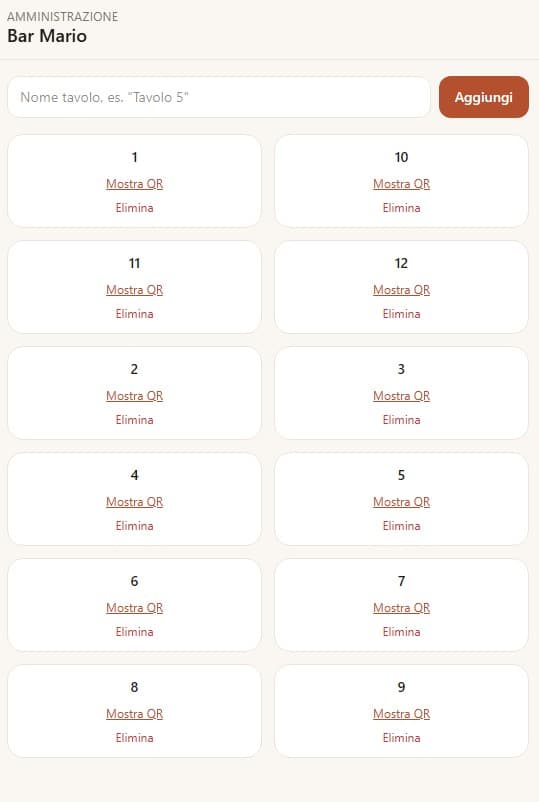
Tables and QR codes at a glance
Each table has its own QR to print. Add as many as you need, with any name you like.
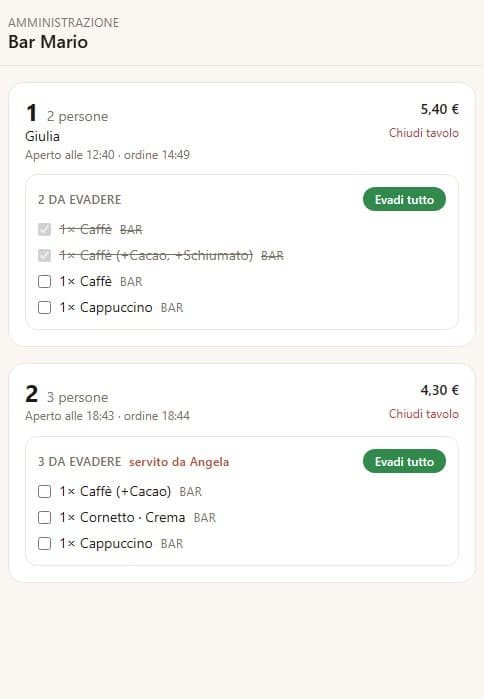
Orders ready to fulfill
Every open table shows what's still owed, department by department: fulfill line by line or all at once with one tap.
A dedicated panel for floor staff
Besides the admin, there's a separate access for waiters: they see open tables (and reserved ones in blue), get the same voice alerts, and can close a bill or split it between several people, without touching menu management.
- Separate access from the admin, with its own link/QR.
- Bill splitting between several people at the same table.
- Table closing, automatically moved to history.
- Service rounds: the first goes out right away, the others are held until the waiter sends them, so the main course doesn't go cold next to the starter.
- Targeted alert: “Angela, two coffees to deliver to table 12” goes only to the waiter who took the order.
The entrance queue, with no paper tickets
Whoever arrives scans the QR at the door, gives a name and the number of guests, and instantly sees their turn full-screen. From the register, admin panel or the waiter's phone, staff can send a heads-up — “Almost there, a few more minutes” — and assign one or more tables: the guest gets “you can come in”, waiters get the alert to welcome them.
- No paper tickets: just a QR to print, even on a sign as small as a quarter of an A4 sheet, with the MenuBar brand and the site.
- Heads-up and table assignment from the register, admin panel or waiter, at any time.
- Clears itself: once the table is closed, the queue forgets the assigned spot, so no stray “you can come in” is left behind.
Bills get collected from a screen built for the register
A screen built for whoever collects payment — on tablet, PC or phone — with the room seen from above always in sight. Tapping a table sends its bill straight to the register; closing a table and collecting payment stay two separate actions.
- Tap-to-add price list with photos and variants, or a keypad for a free amount
- Five open registers at once, to set a half-finished sale aside
- Cash and card payments, even mixed, with change calculated automatically
- Simple paper receipts, and previous sales you can browse back through
- A table that calls for the waiter blinks and beeps at the register too
- The room drawn from above, with the same colors everywhere in the venue
- Installs as an app on the device, with its own icon and the screen kept on
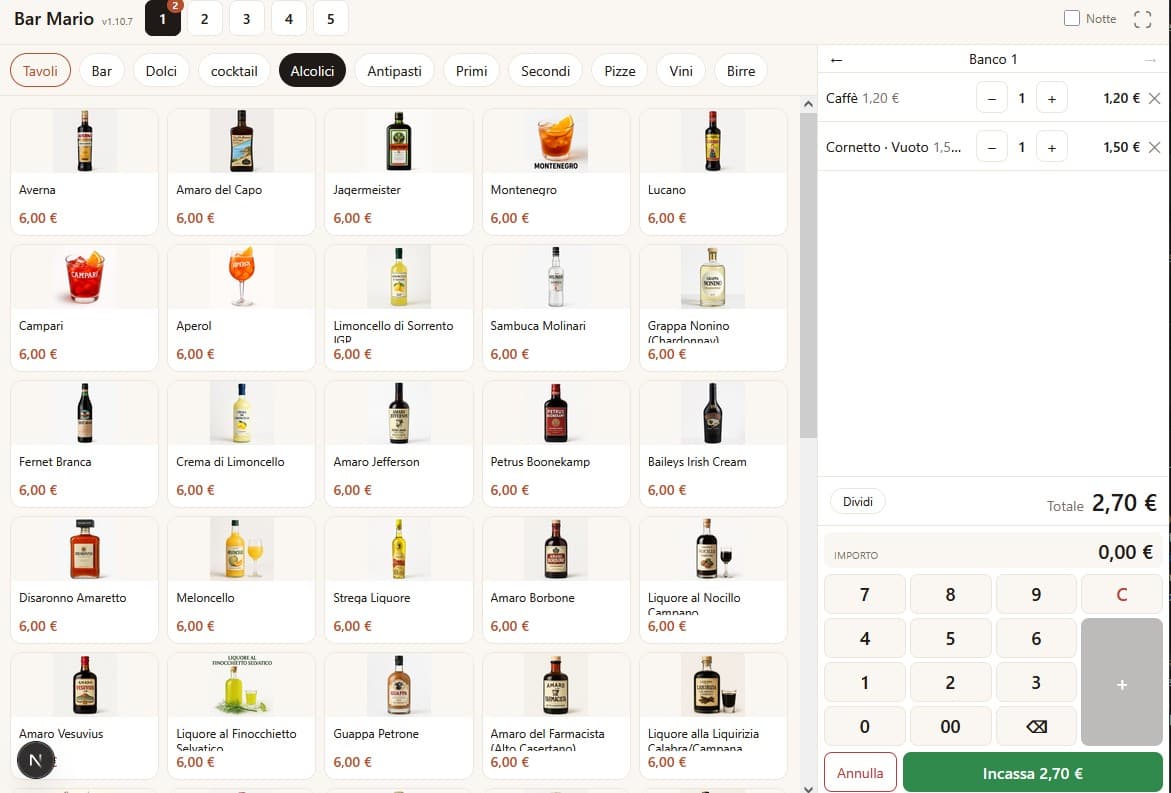
The register, built for whoever collects payment
Tap-to-add price list with photos, a keypad for free amounts, and several registers open at once: a half-finished sale can be set aside without losing the others.
The venue's numbers, without spreadsheets
A chart shows revenue month by month, compared against the previous year. Below, the same period can be read by category, by product, or by who made the sale: the register, the guest's own phone, or a specific waiter.
- Monthly revenue as a bar chart, compared year over year
- Ranking by category, product or waiter, with items sold and share of the total
- Also shows how much guests sold themselves, straight from their phone
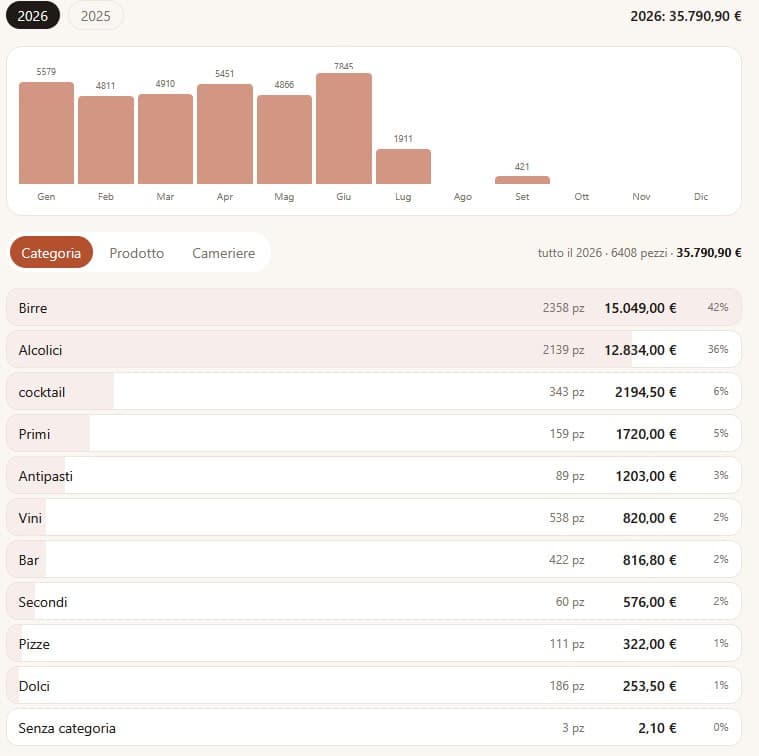
Revenue, month by month
A bar chart per year, to spot strong and weak months at a glance and compare them with the year before.
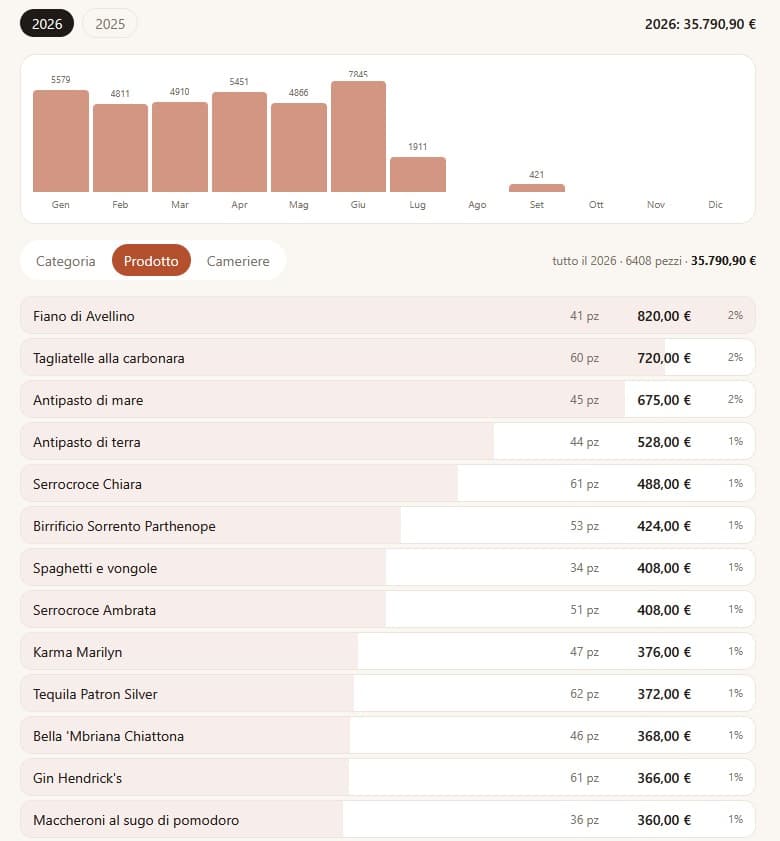
What actually sells
A ranking of the best-selling products for the period, with items sold, revenue and share of the total: as useful for the menu as for supplier orders.
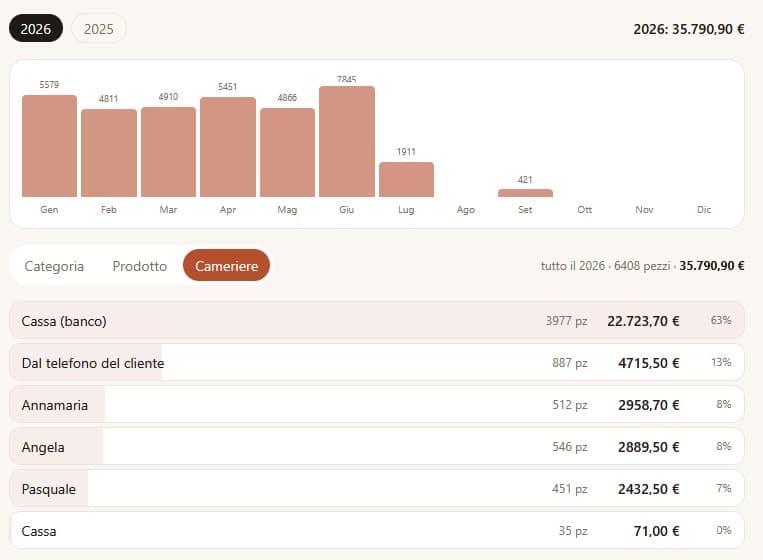
Who sells, and how much
Revenue split by who rang it up — the register, individual waiters, or guests straight from their phone — to see where the revenue actually comes from.
The invoice heads to the Tax Agency on its own
At the register, you pick or create the customer on the spot: closing the sale issues an electronic invoice, numbered by year, which travels on its own to the Interchange System (SDI). The list shows each one's status — in transit, delivered, rejected with the reason — and it can always be resent.
- Electronic XML invoice (FatturaPA), generated automatically from the sale
- Fiscal registry for the venue and its customers: VAT number, tax code, PEC, recipient code
- Invoices emailed to customers, XML attached
- Department and VAT rate per item, carried through correctly onto the invoice
- Receipts are ready to be transmitted to the Tax Agency as soon as its official service goes live

Every invoice, with its status
Delivered, in transit or rejected: the real status reported back by the Interchange System, with the XML always downloadable and a button to resend it.
Menu assistant
At the top of the Menu tab, a box can appear to request changes by voice or in writing: “the Averna is out, hide it”, “coffee goes to 1.30”, “add a pizza slice with anchovies for 3 euros”.
The sentence is interpreted by a language model, which never touches the database directly: it proposes actions from a fixed set, the server checks each one against the venue's real data, and nothing happens until the admin confirms. Deleting isn't among the possible actions: at most, an item gets hidden. Without an AI key configured, the box simply doesn't appear, and everything else works as before.
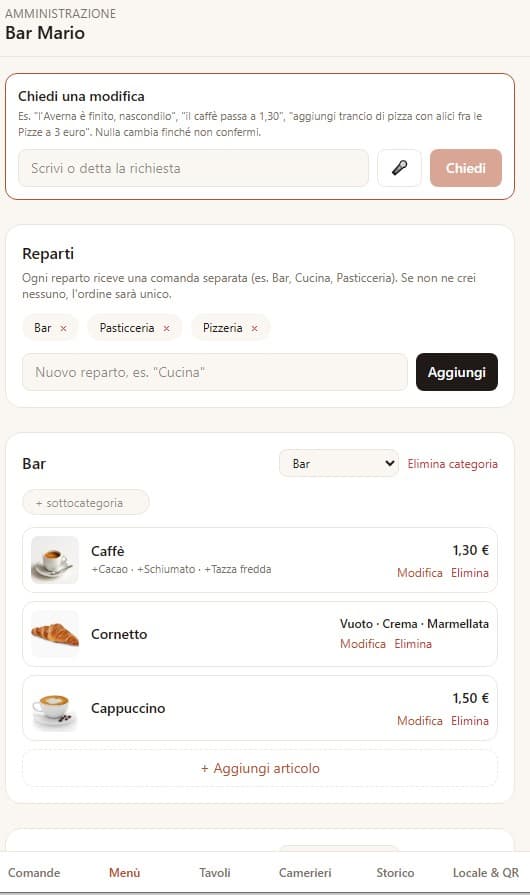
Menu management, with the assistant
Departments, categories and items in one panel. At the top, the box to request changes by voice or in writing.
More features, for every plan
The app keeps growing. Here are the most recently added features, available depending on the plan you choose.
Menu in eight languages
At check-in the guest picks from Italian, English, French, Spanish, Polish, Romanian, Dutch and Russian. Translations are generated with one click from the panel and can be fixed language by language. Orders and bills stay in Italian, for whoever prepares at the counter.
Allergens, as the law requires
The fourteen allergens of EU Regulation 1169/2011 are ticked from a closed list, never typed. They appear in the menu under the item's name; if there are none, the line doesn't appear at all.
Reservations verified on WhatsApp
A dedicated QR, to put in the window or on social media, lets people book and browse the menu, but not order. The phone number is verified with a ready-written WhatsApp message: until it arrives, the booking stays “pending”. Each new booking is announced by voice.
Floor plan: occupied and reserved
The Floor panel shows every table: orange for occupied, blue for reserved, with time and name. A booking gets one or more tables assigned, and a QR opens WhatsApp already on the right customer.
Sunbeds and umbrellas too
A table and a sunbed behave the same way: you order, you book, you close a bill. Types and positions (front row, solarium...) are written by the venue, spots are created in bulk, and each position carries its photo and price, with weekday and holiday rates picked automatically from the date. Guests can choose their spot when booking, if the venue turns it on.
“Complete” with artificial intelligence
In Edit item, “Complete” suggests allergens by reasoning on the dish's name and, where the assistant is enabled, can also generate the photo. It stays a suggestion: you confirm with “Save”. The estimated cost of each request is shown on screen.
A sample menu to start from
Newcomers can import a ready-made menu — bar, desserts, cocktails, wines, pizzas, first and main courses — with photos, descriptions and allergens. Remove what you don't need and import the rest, without duplicating anything.
Full-page item view and index
An eye icon on the card opens the dish's page with a big photo and the full description. Subcategories become a clickable index that follows the scroll: handy for a list with fifty beers. The cart symbol replaces “Add”.
The table is decided by the code
Guests never type the table: the QR (or NFC tag) sets it, and it stays in the address for the whole visit. Scanning the code of an already open table takes you straight into the bill, without registering again.
Guests choose the courses too
In the cart guests split dishes into first course, second course and so on: the cart reorders itself in blocks (“1st round”, “2nd round”) with an animation. Every category has a default round set by the venue: starters and drinks right away, first courses in the second round, mains in the third. The kitchen sees everything, but held dishes stay grey with the note “later”; until sent, a dish can be moved between rounds with the arrows.
Joined tables, one bill
A booking with several tables opens a single shared session: any QR of the group leads to the same cart, and closing the bill frees all the tables. On the floor every table says “joined to table N”, and the guest's phone shows “Tables 1 and 2”.
Who ordered what
Everyone can type their name, remembered for later orders. In the summary each line says who it's for, a second box shows how much each person has put in the cart, and the “coming up” alert also names who is waiting for the dish: handy when several people order from different phones on the same bill.
From booking to table
Bookings without a table form a “To assign” queue, tagged “from app” with the full number, and can be cancelled straight from the queue. As soon as a table is assigned, the floor gets a box with a QR and WhatsApp link with the message ready (“we've assigned you table 5, you can come in”); on the guest's booking page an “Enter and order” button appears by itself and opens that table's menu. The assignment is announced by voice. Each phone can hold only one active booking.
A handier panel
Multiple selection per category, with bulk actions: show, hide or delete several items at once. A pencil next to the name renames categories and subcategories without losing their items. And a night mode for anyone working with the lights off.
Optional modules, venue by venue
AI support and translations are two independent switches: a venue can have translations without the assistant, or the other way round. Where a module is off, its buttons appear grey with the note “option not enabled”, so it's clear the feature exists and only needs switching on.
A conversation, not just an alert
The venue and the guest can message each other during the visit, not just receive one-way alerts: handy for things that are awkward over the phone — “the oven is running ten minutes late, is that OK?” — where the answer matters as much as the question. A message can go to the whole table or to a single person.
Call the waiter with one tap
From their own table, guests can call staff without raising their voice or getting up: the alert reaches whoever is currently looking after that table, with sound and vibration.
“The bill, please” becomes a button
Guests ask for the bill straight from their phone: the request reaches the floor and the register, which collects payment once it arrives, with no need to flag someone down.
Guests decide when to send the next course
No need to wait for the waiter: from their own phone, anyone at the table can send the next course themselves, once the current one is finished.
The room, drawn from above
Tables and chairs as seen from above, with a plate in front of whoever has already eaten: white free, blue occupied, red awaiting payment, green booked, orange asking to open. You read the room by counting chairs, not numbers.
The bill reaches the register with one tap
Tapping a table — in the room view, in admin, or from the waiter's phone — sends its bill straight to the register: guests get up and pay at the counter without anyone having to close the table first.
A bill awaiting payment can't be reopened by accident
Until it's paid, neither the waiter nor a guest scanning the QR can reopen that table: the message says which table, how much is owed, and that it needs settling at the register.
A bill request rings the waiter who served it
The alert reaches the waiter who took that table's orders first; if they don't answer within a minute, it rings across the whole floor. One tap is enough to say “I've got it”.
Reservations with no duplicates, and an agenda at the register
The same table can't be booked twice less than two hours apart. At the register, Booking mode turns the floor into an agenda: dates, times and names at a glance, one tap to confirm.
The register works from a phone too, and installs like an app
Under six inches the price list makes room for the cart, with two panels that scroll like a gallery; the register, admin panel and each waiter install as separate apps, with their own icon and the screen kept on.
Every QR on one sheet, ready to print
A button in Venue & QR prints every table on one A4 sheet, ready to trim, plus a “Test QR” sheet with the menu, reservations, register, admin, two tables and two waiters, to try the whole flow at once.
A display-only spot to show the menu, no ordering
A QR marked “browse only” opens the menu — photos, prices, cart — but won't let an order be sent: handy for a shop window or a demo.
How many people are looking at the menu
A discreet number on the table's box shows how many phones currently have that menu open, updating itself with no extra request needed.
The name arrives already filled in
Anyone who has already checked in at a table (or in the entrance queue) doesn't have to retype their name: the phone remembers it and offers it straight away, even at other tables they open.
One item per screen, phone-sized
In the guest's menu, categories scroll full-page, one item at a time: even on a wide desktop screen, the view stays as narrow as a phone.
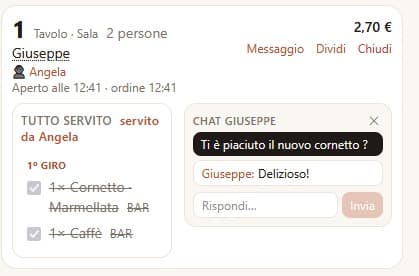
A chat for every table
The venue writes to the table, or to a single person, and the guest replies from the same phone they ordered with: the conversation stays there, instead of getting lost in a spoken message no one remembers.
A plan for every stage of your venue
The digital menu is free. Turn on artificial intelligence or the full order-management system whenever you need them, with a 90-day free trial on every paid plan.
🎉 Launch offer: for the first 10 venues, the software is completely free, on any plan.
Menu only
The digital menu on a QR code, always up to date.
- ✓Unlimited categories, subcategories and items
- ✓Photos, descriptions, prices, options and variants
- ✓Allergens declared per EU regulation
- ✓Venue QR code, ready to print
- ✓No credit card required
Advanced menu with AI
The whole digital menu, managed with the help of artificial intelligence.
- ✓Everything in Menu only
- ✓Assistant that edits the menu by voice or in writing
- ✓Allergens suggested automatically
- ✓Item photos generated by AI
- ✓Menu translated into 8 languages
- ✓Cost of every request always visible
Order management
The Full package: menu, AI and the entire ordering and ticket system.
- ✓Everything in Advanced menu with AI
- ✓Orders from the table, with cart and courses
- ✓Real-time tickets, split by department
- ✓Table management, waiter role and bill splitting
- ✓Cash register (POS): cash and card payments, receipts and sales summary
- ✓Electronic invoicing to the Tax Agency (SDI), with a customer registry
- ✓Reservations verified on WhatsApp
- ✓Tables and sunbeds, with positions and rates
- ✓All optional modules included
Prices + VAT. The first 90 days are free on every paid plan, then change plan anytime, no lock-in.
One system, many venues
Each venue has its own menu, tables and codes, isolated from the others. Creating a new venue is free, with no credit card, and requires an authorization key: a deliberate friction to stop anyone who knows the site's address from filling the system with fake menus. Once you have the key, a name, address, phone number and a photo are enough to get going: the device that creates the menu becomes the admin, immediately receives its own links/QR codes, and starts on the Menu only plan, with the option to move to a higher plan whenever needed.
What you hear
Announcements name things plainly, so staff know what to do without looking at the screen.
How it's built
A website, not an app to install: it works the same on iPhone, Android, tablets and computers, and updates for everyone at once.
- Next.js and React
- Pages and services in the same project, no separate systems to keep in sync.
- Private MySQL/MariaDB database
- Lives next to the application without exposing any port to the internet: only the app can reach it.
- Key-based access
- Distinct, unguessable addresses for admin, waiter and customer.
- Zero-downtime releases
- New versions replace the previous ones instantly, without stopping the service.
- Instant rollback
- Recent versions stay archived: if something goes wrong, you roll back in seconds.
- No unnecessary personal data
- Guests are only asked for a name, and only if they want to give one.